Action Items: Tracking Meeting Commitments in Formis
A Formis action items list is a checklist of commitments, usually from a meeting, built from Formis's Task List widget, the same configurable building block behind Punch list, Safety observation, and any custom checklist a team builds. Each item records what was agreed, who owns it, and when it's due. When the list is submitted, every assignee gets one email with their items.
Action items is a starter template, not a fixed feature
Formis is a configurable construction forms and workflow platform. Teams build whatever forms their project needs: RFIs, daily field reports, inspections, or anything custom. Action items is one of several starter templates Formis provides pre-built, so a team can start tracking meeting follow-ups in minutes instead of designing a form from scratch.
Workflows are configurable too. To save you time, Action items comes with a simple three-step workflow already built: the list is submitted, Formis emails each assignee a digest of their items, and the submission is complete. Everything can be changed in the form designer and the workflow designer.
What goes on an action item
Every item tracks:
- Description: what was agreed, in plain language
- Assignee: who owns it
- Due date: optional
- Status: Open, In progress, or Done
Assignees can mark their own items Done. That comes from a Task List setting, Assignee can close their own items, which we turned on in this starter template.
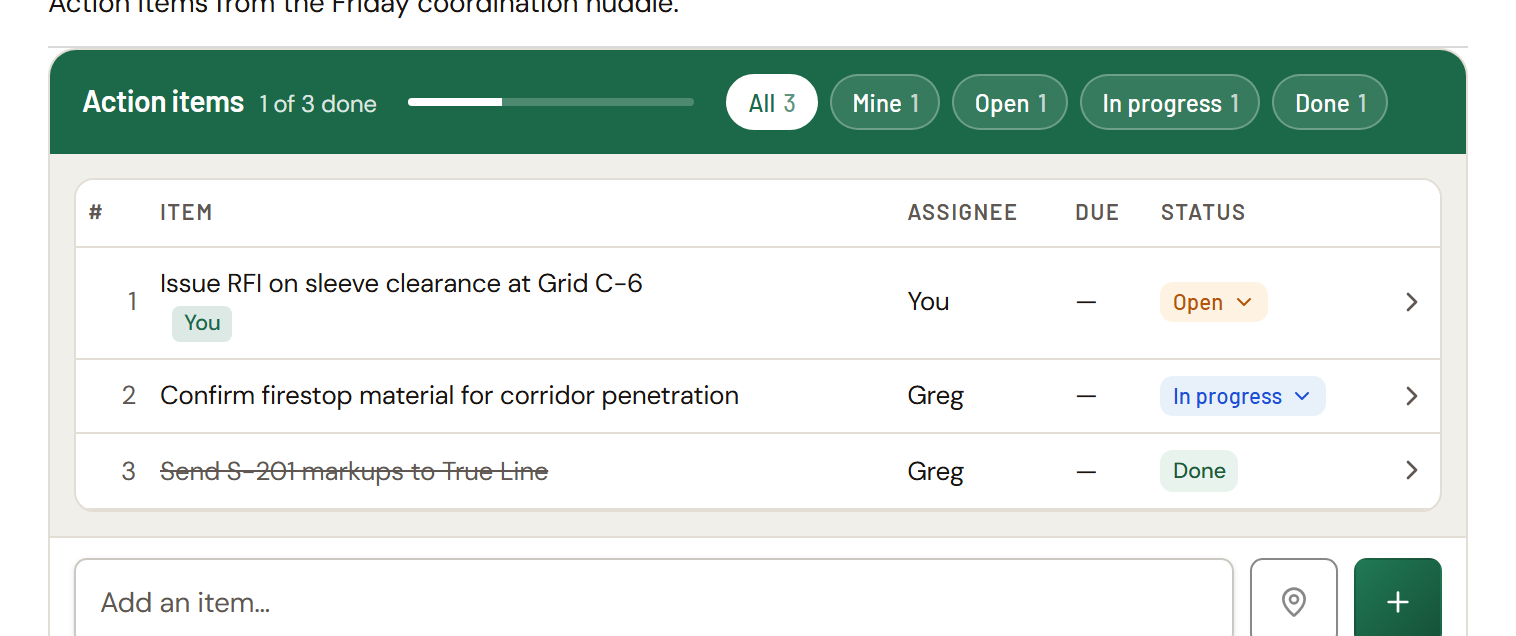
We kept the Action items starter template deliberately short. Photos aren't included, and a form designer can add them if your team wants them. An action items list can also be submitted with no items, since a meeting doesn't always produce follow-ups.
How the workflow runs
- Submit. Whoever ran the meeting enters the commitments and submits the list.
- Email. Each assignee gets one email listing only the items assigned to them.
- Complete. The submission is complete right away.
As we built it, there's no review gate. The submission doesn't wait for items to be finished, and nobody has to sign off. Assignees keep updating their items from Open to In progress to Done, and the list shows where everything stands.
This is the main difference from Punch list and Safety observation, which hold the submission open until every item is closed and then send it to a reviewer. Action items is built for quick, low-friction follow-up, not formal closeout.
Reopening an item
The person who created the list, or anyone in its Managed by roles (Project Manager and Backup PM by default), can reopen a Done item. As shipped, Action items doesn't ask for a reason; the item goes straight back to Open and its assignee is emailed. See Reopening a Task List item.
Notifications
| As configured in the starter template | |
|---|---|
| Digest to assignees | On, sent when the list is submitted |
| Reopen | Always sent to the item's assignee |
| Completion (all items done) | Off, can be turned on |
A due date passing doesn't send an email. Overdue items are highlighted in the list. See Task List notifications.
Making it your own
Because Action items is a starter template on the same engine as everything else, you can:
- Add columns, such as a photo or a priority.
- Turn on the completion email so the meeting owner hears when everything is done.
- Add a review step in the workflow designer if your team wants formal sign-off.
Common questions
Is Action items the only way to track tasks in Formis? No. Formis is a general construction forms and workflow platform. Action items is one pre-built starter template, and the same Task List widget can be added to any form.
Does the submission stay open until every item is done? No. Action items completes on submit. Items are tracked on the list, but nothing waits on them. Punch list and Safety observation are the starter templates that wait for every item to close.
Will assignees get an email? Yes. When the list is submitted, each assignee gets one email listing their items.
Can I add a review step? Yes. Add one in the workflow designer. See Configure routing and approvals.